Showing posts with label personalization. Show all posts

15 January 2013

Moving Beyond the Classroom... Real World Connections

One of my continuing goals has been to get students involved in activities beyond the classroom that both improve their understanding of the content we are covering and giving them the real-world experiences of collaborating, working professionally, taking criticism and presenting what they have done. The best opportunities for this have revolved around student activities and with student club activities.
For in-class activities, my students regularly complete "History Labs" in which they conduct research, develop an interpretation, and create a product to share with the class (as a teaching tool) and with the world (via the web.) Students recently created eBooks and documentary videos that we published online. Students used the class iPads to create eBooks on the Scientific Revolution and the Enlightenment and videos on the revolutions of the late 18th and early 19th centuries. Students shared these with friends and family and the rest of the world. My students are currently finishing their work on their National History Day projects. History Day also asks students to do original research based on a yearly theme and to be critiqued and judged on their work for continual improvement as they move from classroom to school to county to state to national competitions. Over the past several years, many of my students have made it as far as the state level competition. While doing serious historical research on a topic of their choice, students get the exposure to presenting their findings, defending them, and interacting with professionals in the field. It allows them to do the work of real historians.
Other opportunities for real-world interactions come with student activities and clubs. I have had the honor of moderating the Model United Nations Club and National History Bowl and Bee Team at my school. Through these extra-curricular activities, students learn so much about how to work collaboratively, think creatively, and interact with new ideas and people. The Model UN Club has to learn about the issues facing the people of the world, prepare a position (which may not be one they hold), present and debate with a diverse group of people as if they where really at the United Nations. This also gets them to look at real-world problems that the UN deals with on a regular basis. Our History Bowl and Bee Team also gets students thinking about historical topics in different ways and allows students to work as a team in a high pressure competition situation that keeps kids sharp.
Taking opportunities to give students a chance to learn in authentic ways cannot be overestimated. I see vast improvements in my student's engagement and desire to learn more. How do you get your students real-world experiences and authentically engaged inside and outside the classroom?

10 June 2012

A Year-End Reflection: Rationale for Technology in the Education

I was recently asked by an administrator to write a piece on technology use in my classroom to be shared with others.  As one can see from this blog, if I was to write something comprehensive, it would be many pages long.  But he asked me to keep it to a page or two.  Below is what I composed; the best way I could briefly explain and give some detail on the rationale and some examples of the use of technology in my classroom.

Some see technology as a nice addition to education and as something that is not critical to students’ learning. My experience as a teacher over the past dozen years has taught me the opposite. In a time where connective and informative technologies are disrupting every major area of study and industry, an effective use of technology in all disciplines is critical. In fact, one might think that the discipline I teach, social studies, would be one of those least impacted by technology. And if one is wedded to the old idea of the history classroom with big, dusty textbooks, chalkboards, desks facing forward in a row, and a teacher lecturing for the better part of an hour, you might be right. But the social studies classroom of the 21st century doesn’t (and shouldn’t) look like this. There has been a quiet revolution going on in education, and in social studies in particular, attempting to make classrooms more inquiry-driven, critical thinking infused, and generally operating in ways that have students learn and do work in the ways that professionals really do them. If you were to go into the office of a historian or social scientist (geographer, economist, political scientist, archaeologist, etc.) or to a meeting of such professionals, you wouldn’t see much reading from textbooks, writing on chalkboards, or lecturing to each other. What you would see would see would be researchers using documents and data from internet databases, out doing various types of study and research in the field, working collaboratively with other researchers in the same discipline or other disciplines with various connections, and presenting their findings in print or digital form to their colleagues for peer review. This is the humanities and social sciences in the 21st century (and most other professional disciplines would look similar as well). If we want our students to be prepared for such environments (that they will encounter in their careers, but also increasingly in college) we must create such environments in our classrooms. The infusion of modern technologies gives us the best opportunities to do this and in the following paragraphs I will give you several examples of how this works.

Textbooks are notoriously bad. They are poorly written, contain boring material, give limited perspectives, and are outdated the minute they are printed. As a result, I don’t use textbooks in my classes. Despite this, my students read in my history classes daily. They read materials that are far better, more engaging and “real-world” than anything they can get in the textbook. They are reading primary documents, letters, journals, newspaper articles, and other accounts from various periods in history. In doing this, they are engaging in the real work that historians do in conducting research and developing an interpretation of historical events based on documentary evidence from the time, people and places we are studying. In this, they are engaging in a far more interactive and thinking activity then they would get from reading a sanitized textbook. The students access almost all of these documents via the web on websites like the National Archives and Library of Congress sites and through library databases. The volumes of documents available are thousands of times greater than could be put in any book.

Having access to the documents are not enough. Students have to be able to curate the appropriate resources for the topics they are investigating. Years ago, researchers would have piles of documents and monographs in their work-space. Today, this can all be organized and taken with you digitally using software such as Evernote, Diigo and Easybib. These services allow my students to create files online that can be indexed and shared for effective research and collaboration. For document storage and collaboration, students use cloud-based services such as Google Drive and Dropbox to store, date, and collaboratively compose drafts of their final research product. All of this can be checked and monitored by the teacher without the use of paper or turning materials in. All updates by the various collaborators can be followed and checked by the teacher. Various educational social platforms like Edmodo allow students and teachers to discuss class topics and research anytime and anywhere; expanding the opportunities for learning beyond the traditional classroom. In addition, it always helps to learn from the experts. It is difficult to get a professor or someone who experienced a historical event into the classroom, but with video-chat services such as Skype, those experts can be brought into the classroom. This past year I did this on two occasions, one with a woman who lived in East Germany and experienced the fall of the Berlin Wall and one with a school alumnus and former classmate of mine who now lives close to the Fukushima Nuclear Plant in Japan and spoke about his experiences there.

Once the research and curation have been completed, students need to present and/or publish their work as professionals do. While the paper and the oral presentation are still very important, new forms of media are becoming important in various professions for publishing and presenting research and I use this as much as possible in my classes. Throughout the school year, I have my students create webpages with Weebly, make podcasts using Soundcloud, blogs using Blogger, videos using iMovie, online posters using Glogster, and multimedia presentations using Voicethread (just to name a few). This gives them various opportunities to write, compose, publish and present in different mediums. Then using the included tools in such platforms, or through the sharing and comment features in Edmodo, students are able to comment and critique one another’s work and receive feedback from me. The students then collect the products they create in an electronic portfolio that they update throughout the year, and can use to reflect up their growth over that time, and present their work to a wider audience.  Critical to getting my students work to a wider audience has been the National History Day program.  It promotes original student research that is presented at various levels for critique, reflection, improvement and competition.  I encourage all teachers in all disciplines to participate in similar programs to give you students those "real-world" experiences.

To develop students into learners who are creative, collaborative, communicative critical thinkers, technology needs to be part of the picture. Today’s brand of educational technology with devices like the iPad, in its increasingly mobile and connected features, allows for personalized, project, and problem-based learning environments that have not previously been possible. Technology in education is not an addition to education; it is integral to education in the 21st century.

30 May 2012

Google Drive, CloudOn, and Edmodo - A Winning Combination for the iPad in Education


For some time now, I have been an advocate for the use of Google Apps as well as the iPad.  Unfortunately, they don't always work together well.  Google Apps has some great features for content creation and collaboration and the iPad is an amazing device for learning, but the issue of being able to create content (in this case, documents, presentations and spreadsheets), collaborate on the creation of the content, and submit it to a teacher has continued to be an issue since the iPad was introduced.


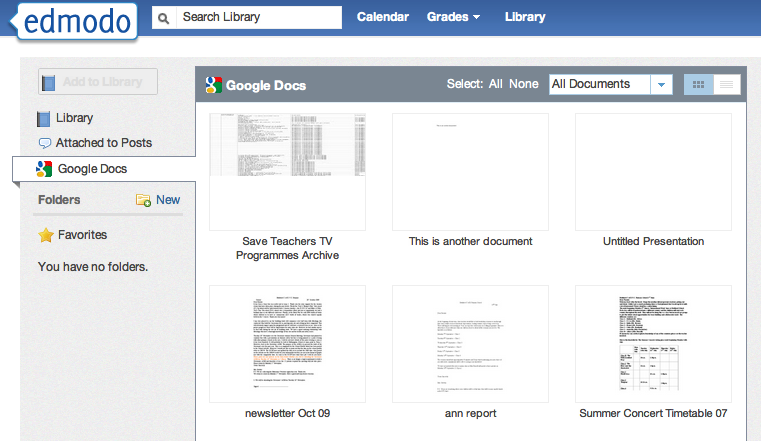
Fortunately, this is no longer an issue thanks to some new features recently added to Edmodo and the CloudOn App.  For those new to these services, Edmodo is an educational social-networking service that allows teacher and students to work collaboratively online, including submitting assignments.  CloudOn is a cloud-based version of Microsoft Office which allows you to create and edit documents, presentations and spreadsheets on the iPad.  Recently, Edmodo added Google Drive/Docs integration into its service.  So, as long as you are logged in to you Google Account on your computer or tablet, you can access your files from Edmodo and submit them to others (either to a teacher as a grade, or if you are a teacher, as an assignment itself).  Just in the past few weeks, CloudOn has also added Google Drive integration (in addition to Dropbox and Box cloud services) to its service, so now iPad users have an effective way to create and edit documents, presentations, and spreadsheets on the iPad.


Using these three services in combination gives one the ability to create a document, edit it, and submit it to a teacher or group of students without ever using a full-fledged computer.  All you need it a Google account and Edmodo account (both free) and the Edmodo and CloudOn Apps (also both free).  This has the great feature of having all of your files being stored in the cloud.  The pending Google Drive App for iPad should also give additional functionality.

So, try it out and let me know what you think.

24 April 2012

The New iPad and the New 1:1 - Personalized Learning


I've written about the iPad before, but the more I use it in the classroom and the more feedback I get from students and teachers the more I am convienced it is the right device for personalized learning in a 1:1 setting. ​The iPad, moving beyond the traditional capabilities of a computer or laptop, is the natural choice for a 1:1 program. As Greg Kuloweic has so clearly stated, the iPad is mobile recording device (audio & video), editing device (audio, video, images & text), publishing platform (blogs, websites, video, audio and screencasts to YouTube), digital notebook and digital research platform. Because of the recent introduction of the device, in-depth data and research is limited, but recent studies have shown an increase in student performance when using the device.

 iPads offer many distinct advantages over laptops or other tablets available, making it the best mobile learning device available. Some commentators have even seen it as a total replacement to their other computing devices. Here is the most comprehesive list I have been able to develop (based on my own experience and the experiences I have read from others) on the features that give the iPad a clear advantage over all other platforms.

 • With iPads and cloud-based computing systems, students can work from anywhere at school with greater portability and connectivity. Schools also don’t have to pay for computing power that they no longer need. USB and optical drives become irrelevant and unnecessary with cloud-based storage such as iCloud, Dropbox, and Evernote.

 • Schools have found creative ways to use iPads to save money, especially when moving toward a paperless environment. From homework and tests to digital textbooks, the iPad offers numerous ways to eliminate paper, saving dollars and the environment. Wireless printing can also be accomplished from the iPad via Airprint, but will become less necessary with paperless assignment submission.

 • It occupies a new space in technology, one which is still undefined to some extent, yet which is likely to be significant over time. The space is between the mobile space occupied by phones and iPods, and the portable space which is where laptops and netbooks live. The new position in between these established areas is one in which the iPad largely does what the other devices offer yet also offers so much more.

 • The iPad will help to personalize learning - it is widely recognized the 1 to 30 one-way knowledge-transfer model is fast becoming redundant as project/problem/inquiry-based learning is becoming more prevalent in modern schools. The iPad is perfect for this type of personalized learning. As teachers begin to create new ways of tackling this issue, the iPad could play a useful role in this transformation. The form factor, battery life and apps mean that the iPad can be an ‘anywhere anytime’ learning device. This makes it ideal for projects and learning which take place out of the classroom, in the schools grounds, on a day visit or residential stay.

 • The iPad could be the beginning of the end of the dominance of old, slow school-based networks in education. How much time is wasted not being able to ‘log in’? How often is the network ‘down’? The iPad could hold all the apps a learner needs for a day/week/month/term’s work on the device itself or on off-campus cloud storage.

 • The iPad's instant-on & all-day battery features really make it a ideal devce for regular use in education. It’s possible to get on the net and find the information you require using an iPad before a laptop has finished running through its boot-up sequence. Using a device all through the school day without having to charge it up saves a huge amount of time for teachers and learners.

 • The apps which run the iPad (and other iOS devices) signal the way forward when it comes to saving work learners produce and create with the auto-save feature. Saving files takes place automatically ‘behind the scenes’ constantly in the background, which means learners (and teachers) know their work is always safe. No more excuses like ‘I forgot to save my homework’ etc. anymore!

 • Apple’s App Store has more educational titles than any other location, many of them free. This is advantage over many competitors’ apps stores and also allows for high quality, virus-free apps that are guaranteed to work on the devices. The new iTunesU platform also allows for easy and free online course content creation and sharing.

 • Wireless connectivity via Airplay allows the iPad screen to be wirelessly streamed to a projector or television via the $99 Apple TV device (this can also be done via PC using various apps). This is much less expensive than a Digital Whiteboard and allows the teacher to move around the class while interacting with the screen and allows both student and teacher devices to connect to the projector as needed.

 • The iPad, unlike a Nook or Kindle Fire, has the ability to download and read books from all various bookstores and publishers through iBooks, the Nook App, the Kindle App, and various others. The new iBooks Author tool also gives teachers and students the ability to create their own books.

When all the potential functionality of the iPad is added up, it becomes clear that the iPad is the ultimate personalized-learning device. It can be a science lab, literacy tool, research station, history archive, language lab, art canvas, music studio, video editing suite, math computation center and library.

 - Posted using BlogPress from my iPad

07 January 2012

The Three P's


Last year I wrote a post on the Six C’s of 21st century learning, an idea that I was going to apply to my classes in designing lessons, units, and my overall curricula. I find putting a framework over the learning process and involving students in shaping and understanding that process to work very well to increase student engagement and proficiency. I have continued to experiment with considerable success and moving forward I have identified another set of themes that I would like to use in addition (and imposed on top of) the Six C’s.

I am terming this set the 3 P’s – Personalization, Project-Based Learning, and Portfolio Assessment. Personalization is key to reaching every student in the 21st century classroom. Personalization takes the ideas of individualization and differentiation to the next level with new techniques and new technologies. A recent article in THE Journal addresses the primary themes of personalization and is worth a close reading. It is only through the true personalization of learning that we can hope to reach every student, tap into their natural abilities and life experiences, and challenge them to grow beyond what they are and reach their fullest potential.

Project-based learning is the strongest methodology to achieve the personalization for each learner and impart the 21st century skills that students need. Let me clarify that I mean "project-based" in the broadest sense of the term. In my own classes, I employ a variety of techniques that could be classified as project, problem, inquiry, or challenge-based. Each builds upon constructivist and connectivist ideas that I've discussed before on this blog. Each makes the student the center of learning and requires of them the types of skills needed for dynamic and changing world.

I include portfolio assessment as one of the 3 P's since it is becoming the essential tool for authentic and innovative assessment. Portfolios allow students to see their work develop over time, to reflect on what they have done, to see how they can improve their work, and to connect their work across classes and content areas. Portfolios when digital years ago and are now going mobile with various formats available for smartphones, tablets and laptops.

I'm making a concerted effort in all of my classes to increasing incorporate aspects of the 3 P's. I've increased my use of project-based learning over the past several years until it makes up the basis of the pedagogy I use in my classes, this year I have begun experimenting with students developing their own digital portfolios for deeper assessment and self-reflection, and I continue to strive to tap into my students passions, interests, experiences and needs to personalize their learning opportunities.

Please let me know your thoughts about the 3 P's. Comments welcomed.

- Posted using BlogPress from my iPad 2