17 March 2013

Using Simulations for Deep Learning

This school year, I took over moderating our Model United Nations program at school. I knew the basics of how Model UN or MUN worked, but I really tried to let the students lead and teach me more about the process. We have had a successful year as our students participated in two conferences and came away with multiple awards. The students learned a lot from the experience that they had at the Model UN conferences, including deep understanding, analysis, critical thinking, negotiating and interpersonal skills.

As I learned more, I came up with the idea of trying to bring MUN into the classroom. I thought about it for a while and I finally came up with the Paris Peace Conference of 1919 as an interesting historical situation to try to introduce my students to the basics of parliamentary procedure and the consequences of resulting decisions.

We had been discussing the early 20th century and the First World War in my World History and AP European History classes and I gave my students about a week to research their roles. Students worked alone or in pairs (depending on the class size) to represent a nation at the peace conference. Along with the allied nations who dominated the conference, some countries who were not actually there were also played by students in this part of the conference. This included the defeated nations (Germany, Austria, the Ottoman Empire) and various colonies (Kenya and Vietnam). Students used various web resources to research their role and prepare and opening statement for the first day of the conference.

During the first day, students were very much learning the process, especially when it came to parliamentary procedure. Soon they got the hang of the methods and started to propose various resolutions and openly debate. Several students took their roles very seriously, dressing and acting the parts to the best of their abilities. The true measure of the learning in happening in the experience was based on whether or not students acted, spoken, and voted as the nations whom they were representing would have at the actual conference in 1919. I did not want this to restrict the students creativity or possibility of supporting various measures through negotiations and deals, but we also did not want to stray too far from the actual history.

Over the course of the three days of our model conference most of the debate that occured and the resolutions that were both accepted and rejected matched pretty well what would have occured at the Paris Peace Conference had it been set up this way. Even though many nations were there who were not their in the real conference, it was secretly established from the beginning that these nation's votes would not count. It was only toward the end of the conference when simple majorities of all of the nations were passing measures, but there was not a majority of the victors voting for it and, therefore, the resolutions were not passing did it become apparent that the "game was fixed." This made these students unhappy and even upset, but that was exactly the point. In it's own way it was suppose to reflect the feelings of these nations as a result of what happened at the conference and thus led to the further conflicts in the years following.

After getting feedback from the students, I am confident that it was a memorable learning experience for them. I think they learned far more in doing the preparation for the event and the event itself than reading about it, getting a lecture, or watching a video. The value of learning research skills, role-play, social interaction and learning the basics of parliamentary procedure and negotiation cannot be overstated. The students had a lot of fun as well. And we all know we learn more when we have fun.


15 January 2013

Moving Beyond the Classroom... Real World Connections

One of my continuing goals has been to get students involved in activities beyond the classroom that both improve their understanding of the content we are covering and giving them the real-world experiences of collaborating, working professionally, taking criticism and presenting what they have done. The best opportunities for this have revolved around student activities and with student club activities.
For in-class activities, my students regularly complete "History Labs" in which they conduct research, develop an interpretation, and create a product to share with the class (as a teaching tool) and with the world (via the web.) Students recently created eBooks and documentary videos that we published online. Students used the class iPads to create eBooks on the Scientific Revolution and the Enlightenment and videos on the revolutions of the late 18th and early 19th centuries. Students shared these with friends and family and the rest of the world. My students are currently finishing their work on their National History Day projects. History Day also asks students to do original research based on a yearly theme and to be critiqued and judged on their work for continual improvement as they move from classroom to school to county to state to national competitions. Over the past several years, many of my students have made it as far as the state level competition. While doing serious historical research on a topic of their choice, students get the exposure to presenting their findings, defending them, and interacting with professionals in the field. It allows them to do the work of real historians.
Other opportunities for real-world interactions come with student activities and clubs. I have had the honor of moderating the Model United Nations Club and National History Bowl and Bee Team at my school. Through these extra-curricular activities, students learn so much about how to work collaboratively, think creatively, and interact with new ideas and people. The Model UN Club has to learn about the issues facing the people of the world, prepare a position (which may not be one they hold), present and debate with a diverse group of people as if they where really at the United Nations. This also gets them to look at real-world problems that the UN deals with on a regular basis. Our History Bowl and Bee Team also gets students thinking about historical topics in different ways and allows students to work as a team in a high pressure competition situation that keeps kids sharp.
Taking opportunities to give students a chance to learn in authentic ways cannot be overestimated. I see vast improvements in my student's engagement and desire to learn more. How do you get your students real-world experiences and authentically engaged inside and outside the classroom?

19 August 2012

Engaging Content for the History Flip


My VoiceThread on the French Revolution

For the past several years I have been experimenting with different aspects of the flip model in my social studies classes. I think the key element of the model is to get students activated in the classroom (and throughout instruction) and to move away (as much as possible) from content delivery (something that new resources and technology can do just as well, or better.) I would much rather have my students learn an combination of content and skills through discussions, document analysis, historical investigations, projects and the like. This is really nothing new, John Dewey explored constructivist methods of education more than a century ago. Since that time, social constructivist theories and connectivist theories have expanded Dewey's ideas for the 21st century environment. As a result, the flip model brings together 21st century instruction techniques such as screencasting, social networking, and bring-your-own-technology and combines with with techniques such as project, problem, inquiry and passion-based learning.

Crash Course World History -  The French Revolution

As a result of the flip instruction model, a lot can be done in the history and social studies classroom. I began this process myself by moving to a more inquiry and project-based model in my world history classes and supplementing the content material by moving my traditional lectures to Voicethread for students to view on their own time. This worked pretty well, but I still had issues with students relying on lecture-based content delivery and my issues with overburdening students with homework.

History Teachers - "Revolution in France."

So, I continue to experiment and rethink how I will implement my instruction to best help all of my students. I know that my focus will further be on how authentic history learning can be employed both inside and outside of the classroom. I am particularly interested in reducing the amount of content consumed at home while at the same time making it more interesting. For my world history courses, this means utilizing one of my new favorite resources - Crash Course World History. The (what will soon be a series of 40) videos created by the team here do a great job covering the basics of most of what I want my students to know. I would also supplement this with the musical talents of the History Teachers - History for Music Lovers, a great set of topic specific videos based on recent pop hits.  It all comes back to the idea of teachers being great curators.  As a result, I am thinking of reducing my VoiceThread screencasts to general overview of topics at the beginning of a unit, to topics not covered by the resources mentioned above, and for review purposes at the end of the unit. By bringing the other videos into VoiceThread or embedding them in Edmodo, I can still give my students a way to interact and ask questions of me. Plus, I know the creators of the videos listed above monitor their YouTube channels and answer student questions, adding another great interactive resource.

I think there are a lot of possibilites for increasing student engagement both with online content and what is done in the classroom. For more insights on this, read Tom Driscoll's post here.


01 August 2012

Connecting Globally with Students and Teachers

With Connected Educator Month beginning today, I thought this would be a good time to do some reflection on my global educational experiences this summer. When I graduated high school some 16 years ago, I never expected that some day I would represent my school as a teacher-ambassador in China and take students to five different countries in Europe as I was able to do this summer. When I joined the faculty of Mt. St. Joseph High School seven years ago, I was very excited to be teaching social studies at my alma mater and I knew I wanted global education to become central to my teaching. In the years since I have made many efforts to expand global education at St. Joe through innovative classroom instruction, organizing student trips to Europe and Japan, and becoming involved in the National Consortium for Teaching about Asia (NCTA) program which sent me to China this summer.

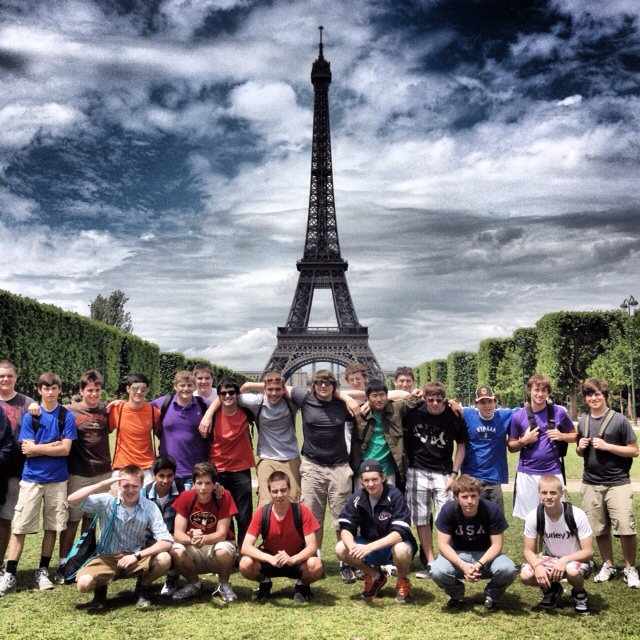
My first overseas adventure this summer involved myself and 48 other (30 of which were students) from my school visiting the Netherlands, Belgium, Luxembourg, France and Germany in a tour that took us to the "Battlefields of Europe" as well as many of its most beautiful towns and cities. It was an amazing two weeks of historical ad cultural exploration that our students will never forget. I began leading student tours in 2008 and I feel it is a critical part of expanding student's exposure to the world around them. Not all teachers and students can do this, but the more who do we will all benefit for this. Also, the connections and contacts made on such tours allow me to bring people from around their world into my regular classroom through writings, discussions and video chats.

I was fortunate enough to be selected with a group of 20 other teachers from across the United States to participate in the NCTA residential study program at Zhejiang University in Hangzhou, China for two weeks in July. During the program we studies Chinese history, language, culture, economic development, and current issues. We also were lucky enough to visit schools, businesses, farms and factories where we could see the Chinese system at work. Through these experiences, which included observing young Chinese students learning English and viewing in awe as over 100 high-rise buildings being constructed at once, I realized that, despite many problems to overcome, China is preparing for the 21st century and we need to be doing the same.

I will be sharing my experience this summer with my students when I return to MSJ in the fall. I hope that we can expand this with more extensive and meaningful experiences such as Chinese language instruction and student exchanges with schools in China. I have already made plans for a student tour to China in the summer of 2014. The future of the world will be greatly influenced by the rise of China and I hope that we can be ready for it. By becoming connected global educators and students I think we can prepare for the new world evolving around us.


10 June 2012

A Year-End Reflection: Rationale for Technology in the Education

I was recently asked by an administrator to write a piece on technology use in my classroom to be shared with others.  As one can see from this blog, if I was to write something comprehensive, it would be many pages long.  But he asked me to keep it to a page or two.  Below is what I composed; the best way I could briefly explain and give some detail on the rationale and some examples of the use of technology in my classroom.

Some see technology as a nice addition to education and as something that is not critical to students’ learning. My experience as a teacher over the past dozen years has taught me the opposite. In a time where connective and informative technologies are disrupting every major area of study and industry, an effective use of technology in all disciplines is critical. In fact, one might think that the discipline I teach, social studies, would be one of those least impacted by technology. And if one is wedded to the old idea of the history classroom with big, dusty textbooks, chalkboards, desks facing forward in a row, and a teacher lecturing for the better part of an hour, you might be right. But the social studies classroom of the 21st century doesn’t (and shouldn’t) look like this. There has been a quiet revolution going on in education, and in social studies in particular, attempting to make classrooms more inquiry-driven, critical thinking infused, and generally operating in ways that have students learn and do work in the ways that professionals really do them. If you were to go into the office of a historian or social scientist (geographer, economist, political scientist, archaeologist, etc.) or to a meeting of such professionals, you wouldn’t see much reading from textbooks, writing on chalkboards, or lecturing to each other. What you would see would see would be researchers using documents and data from internet databases, out doing various types of study and research in the field, working collaboratively with other researchers in the same discipline or other disciplines with various connections, and presenting their findings in print or digital form to their colleagues for peer review. This is the humanities and social sciences in the 21st century (and most other professional disciplines would look similar as well). If we want our students to be prepared for such environments (that they will encounter in their careers, but also increasingly in college) we must create such environments in our classrooms. The infusion of modern technologies gives us the best opportunities to do this and in the following paragraphs I will give you several examples of how this works.

Textbooks are notoriously bad. They are poorly written, contain boring material, give limited perspectives, and are outdated the minute they are printed. As a result, I don’t use textbooks in my classes. Despite this, my students read in my history classes daily. They read materials that are far better, more engaging and “real-world” than anything they can get in the textbook. They are reading primary documents, letters, journals, newspaper articles, and other accounts from various periods in history. In doing this, they are engaging in the real work that historians do in conducting research and developing an interpretation of historical events based on documentary evidence from the time, people and places we are studying. In this, they are engaging in a far more interactive and thinking activity then they would get from reading a sanitized textbook. The students access almost all of these documents via the web on websites like the National Archives and Library of Congress sites and through library databases. The volumes of documents available are thousands of times greater than could be put in any book.

Having access to the documents are not enough. Students have to be able to curate the appropriate resources for the topics they are investigating. Years ago, researchers would have piles of documents and monographs in their work-space. Today, this can all be organized and taken with you digitally using software such as Evernote, Diigo and Easybib. These services allow my students to create files online that can be indexed and shared for effective research and collaboration. For document storage and collaboration, students use cloud-based services such as Google Drive and Dropbox to store, date, and collaboratively compose drafts of their final research product. All of this can be checked and monitored by the teacher without the use of paper or turning materials in. All updates by the various collaborators can be followed and checked by the teacher. Various educational social platforms like Edmodo allow students and teachers to discuss class topics and research anytime and anywhere; expanding the opportunities for learning beyond the traditional classroom. In addition, it always helps to learn from the experts. It is difficult to get a professor or someone who experienced a historical event into the classroom, but with video-chat services such as Skype, those experts can be brought into the classroom. This past year I did this on two occasions, one with a woman who lived in East Germany and experienced the fall of the Berlin Wall and one with a school alumnus and former classmate of mine who now lives close to the Fukushima Nuclear Plant in Japan and spoke about his experiences there.

Once the research and curation have been completed, students need to present and/or publish their work as professionals do. While the paper and the oral presentation are still very important, new forms of media are becoming important in various professions for publishing and presenting research and I use this as much as possible in my classes. Throughout the school year, I have my students create webpages with Weebly, make podcasts using Soundcloud, blogs using Blogger, videos using iMovie, online posters using Glogster, and multimedia presentations using Voicethread (just to name a few). This gives them various opportunities to write, compose, publish and present in different mediums. Then using the included tools in such platforms, or through the sharing and comment features in Edmodo, students are able to comment and critique one another’s work and receive feedback from me. The students then collect the products they create in an electronic portfolio that they update throughout the year, and can use to reflect up their growth over that time, and present their work to a wider audience.  Critical to getting my students work to a wider audience has been the National History Day program.  It promotes original student research that is presented at various levels for critique, reflection, improvement and competition.  I encourage all teachers in all disciplines to participate in similar programs to give you students those "real-world" experiences.

To develop students into learners who are creative, collaborative, communicative critical thinkers, technology needs to be part of the picture. Today’s brand of educational technology with devices like the iPad, in its increasingly mobile and connected features, allows for personalized, project, and problem-based learning environments that have not previously been possible. Technology in education is not an addition to education; it is integral to education in the 21st century.

30 May 2012

Google Drive, CloudOn, and Edmodo - A Winning Combination for the iPad in Education


For some time now, I have been an advocate for the use of Google Apps as well as the iPad.  Unfortunately, they don't always work together well.  Google Apps has some great features for content creation and collaboration and the iPad is an amazing device for learning, but the issue of being able to create content (in this case, documents, presentations and spreadsheets), collaborate on the creation of the content, and submit it to a teacher has continued to be an issue since the iPad was introduced.


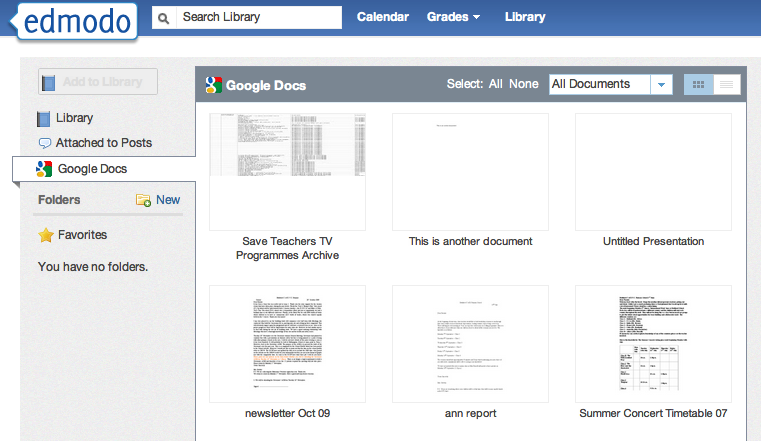
Fortunately, this is no longer an issue thanks to some new features recently added to Edmodo and the CloudOn App.  For those new to these services, Edmodo is an educational social-networking service that allows teacher and students to work collaboratively online, including submitting assignments.  CloudOn is a cloud-based version of Microsoft Office which allows you to create and edit documents, presentations and spreadsheets on the iPad.  Recently, Edmodo added Google Drive/Docs integration into its service.  So, as long as you are logged in to you Google Account on your computer or tablet, you can access your files from Edmodo and submit them to others (either to a teacher as a grade, or if you are a teacher, as an assignment itself).  Just in the past few weeks, CloudOn has also added Google Drive integration (in addition to Dropbox and Box cloud services) to its service, so now iPad users have an effective way to create and edit documents, presentations, and spreadsheets on the iPad.


Using these three services in combination gives one the ability to create a document, edit it, and submit it to a teacher or group of students without ever using a full-fledged computer.  All you need it a Google account and Edmodo account (both free) and the Edmodo and CloudOn Apps (also both free).  This has the great feature of having all of your files being stored in the cloud.  The pending Google Drive App for iPad should also give additional functionality.

So, try it out and let me know what you think.

23 May 2012

The Power of a Personal Story

As a social studies teacher, I have always tried to bring personal stories and perspectives to my students from people around the world and across historical periods.  Usually, those have taken the form of documentary evidence in letters, journals, diaries, and records of various historically significant people.  With the development of video in the 20th century, those written accounts can be supplemented by people speaking about the history that they have experienced on film.  In the 21st century we now have the added capacity to speak to people around the world in real-time through the various video chat services that are available, most notably Skype.

I have taken this opportunity twice recently to have my students speak to people who have experienced historical or current events.  The first instance had a friend of mine, Melanie Arnold, whom I met on a trip to Prague two years ago, speak about her experiences growing up in East Germany during the 1980s, her family leaving the country, the experiences surrounding the fall of the Berlin Wall in 1989 and life in Germany and Europe since then.  She spoke for 40 minutes with my AP European History students and it was an conversation that gave them a new perspective on how life in Europe has changed over the past 30 years.


This week my students in my World History course were studying the impact of nuclear technologies on the world in the late 20th and early 21st centuries.  One of the topics we looked at were the benefits and dangers of nuclear power.  To give them a good perspective on the potential dangers, I had my students speak with a friend of mine, Christopher Godish, who I went to high school with who now teacher in Japan.  He lives about 50 miles from the Fukushima Daichi Nuclear Powerplant and in the zone affected by the earthquake of March 2011.  He spoke about his experiences the day of and after the earthquake and the continuing concerns around the nuclear plant.  This gave the students a solid first-hand account of recent events that are still having a significant impact on our world.


Tools like Skype open the world to our students and all teachers should be thinking about ways to incorporate this into their classrooms.  There are many examples beyond Social Studies how this could be used (English classes can speak with a author, Science classes can speak with scientists, etc.) and I am looking forward to repeating these experiences next year and hopefully expand them to include other speakers such as historians, economists, archaeologists and others.

This post is also posted at Teachercast

Posted using Blogsy for iPad

24 April 2012

The New iPad and the New 1:1 - Personalized Learning


I've written about the iPad before, but the more I use it in the classroom and the more feedback I get from students and teachers the more I am convienced it is the right device for personalized learning in a 1:1 setting. ​The iPad, moving beyond the traditional capabilities of a computer or laptop, is the natural choice for a 1:1 program. As Greg Kuloweic has so clearly stated, the iPad is mobile recording device (audio & video), editing device (audio, video, images & text), publishing platform (blogs, websites, video, audio and screencasts to YouTube), digital notebook and digital research platform. Because of the recent introduction of the device, in-depth data and research is limited, but recent studies have shown an increase in student performance when using the device.

 iPads offer many distinct advantages over laptops or other tablets available, making it the best mobile learning device available. Some commentators have even seen it as a total replacement to their other computing devices. Here is the most comprehesive list I have been able to develop (based on my own experience and the experiences I have read from others) on the features that give the iPad a clear advantage over all other platforms.

 • With iPads and cloud-based computing systems, students can work from anywhere at school with greater portability and connectivity. Schools also don’t have to pay for computing power that they no longer need. USB and optical drives become irrelevant and unnecessary with cloud-based storage such as iCloud, Dropbox, and Evernote.

 • Schools have found creative ways to use iPads to save money, especially when moving toward a paperless environment. From homework and tests to digital textbooks, the iPad offers numerous ways to eliminate paper, saving dollars and the environment. Wireless printing can also be accomplished from the iPad via Airprint, but will become less necessary with paperless assignment submission.

 • It occupies a new space in technology, one which is still undefined to some extent, yet which is likely to be significant over time. The space is between the mobile space occupied by phones and iPods, and the portable space which is where laptops and netbooks live. The new position in between these established areas is one in which the iPad largely does what the other devices offer yet also offers so much more.

 • The iPad will help to personalize learning - it is widely recognized the 1 to 30 one-way knowledge-transfer model is fast becoming redundant as project/problem/inquiry-based learning is becoming more prevalent in modern schools. The iPad is perfect for this type of personalized learning. As teachers begin to create new ways of tackling this issue, the iPad could play a useful role in this transformation. The form factor, battery life and apps mean that the iPad can be an ‘anywhere anytime’ learning device. This makes it ideal for projects and learning which take place out of the classroom, in the schools grounds, on a day visit or residential stay.

 • The iPad could be the beginning of the end of the dominance of old, slow school-based networks in education. How much time is wasted not being able to ‘log in’? How often is the network ‘down’? The iPad could hold all the apps a learner needs for a day/week/month/term’s work on the device itself or on off-campus cloud storage.

 • The iPad's instant-on & all-day battery features really make it a ideal devce for regular use in education. It’s possible to get on the net and find the information you require using an iPad before a laptop has finished running through its boot-up sequence. Using a device all through the school day without having to charge it up saves a huge amount of time for teachers and learners.

 • The apps which run the iPad (and other iOS devices) signal the way forward when it comes to saving work learners produce and create with the auto-save feature. Saving files takes place automatically ‘behind the scenes’ constantly in the background, which means learners (and teachers) know their work is always safe. No more excuses like ‘I forgot to save my homework’ etc. anymore!

 • Apple’s App Store has more educational titles than any other location, many of them free. This is advantage over many competitors’ apps stores and also allows for high quality, virus-free apps that are guaranteed to work on the devices. The new iTunesU platform also allows for easy and free online course content creation and sharing.

 • Wireless connectivity via Airplay allows the iPad screen to be wirelessly streamed to a projector or television via the $99 Apple TV device (this can also be done via PC using various apps). This is much less expensive than a Digital Whiteboard and allows the teacher to move around the class while interacting with the screen and allows both student and teacher devices to connect to the projector as needed.

 • The iPad, unlike a Nook or Kindle Fire, has the ability to download and read books from all various bookstores and publishers through iBooks, the Nook App, the Kindle App, and various others. The new iBooks Author tool also gives teachers and students the ability to create their own books.

When all the potential functionality of the iPad is added up, it becomes clear that the iPad is the ultimate personalized-learning device. It can be a science lab, literacy tool, research station, history archive, language lab, art canvas, music studio, video editing suite, math computation center and library.

 - Posted using BlogPress from my iPad

01 April 2012

Creating the 21st Century Classroom

Technology does not make a classroom learning experience. The interaction of the learner to the skills and content central to the class, supported by a great teacher is central to a successful learning experience. But, as any engaged teacher knows, the current learning environment is changing rapidly due to the massive changes happening in our world. Technology is a central part of this change, driving innovation in science, business, communications and politics.

I've been fortunate enough to be in a position at the school at which I teach to be a leader in new techniques using technology, as someone who is has a voice in decisions relating to these issues, and as an educator who has been given the tools to experiment with new learning methods.

So, in this post, I just want to give a brief overview of the tools that I am currently using. In later posts I will talk about the impact and usage of each in a high school social studies classroom in 2012.


I have a dozen student desktops in my classroom. These "middle of the road" machines are great for internet access, typing, creating webpages, recording video and audio (via webcams)


I also have a set of a dozen iPads and a dozen netbooks which make flexible the learning process in the classroom. In using the iPads over the past several months, I have become convinced that they are powerful learning and creation tools capable of interactions not possible on desktops and laptops.


And while I think getting technology in the hands of students is by far the most important goal in using these tools, having strong teacher tools for demonstrating and modeling are critical. I am lucky to have a desktop PC attached to a projector and interactive whiteboard. I also have an Apple TV connected to my projector to mirror the iPad (mine and the ones the students use) on the screen. I also have a scanner and printer (for those limited times when paper still is used). I also have a webcam set up on my interactive whiteboard to have guest speakers in class via Skype (see the pic below of a session I just had with a friend from Germany.)


I know that I am luckier that most educators in what I have available in my classroom, but steps can be taken by all schools, teachers, and students to incorporate technology into 21st century learning by using what is available and taking advantage of items like smartphones to break the old paradigms.

What tools do you think are critical to a 21st century learning environment?

- Posted using BlogPress from my iPad

03 March 2012

Beyond the 3R's

Last week the librarian at my school and I lead a professional development session on new literacies in the 21st century.  My school has been focusing on the theme of literacy for the past year and we wanted to make sure that we have a broad definition of what literacy means today.  We discussed how it is no longer enough for our students to have the basic skills or reading and writing in an age of digital media, on-demand audio and video, and social networking.  In addition to discussing the philosophical and pedagogical aspects, we gave some practical ideas about using applications such as Evernote, VoiceThread, Dropbox, and Edmodo to foster 21st centuries literacies.

All in all, the session went well and gave our teachers many new things to think about.  Below is a short introductory video I created for the beginning of the session using Explain Everything on my iPad.


- Posted using BlogPress from my iPad 2

07 January 2012

The Three P's


Last year I wrote a post on the Six C’s of 21st century learning, an idea that I was going to apply to my classes in designing lessons, units, and my overall curricula. I find putting a framework over the learning process and involving students in shaping and understanding that process to work very well to increase student engagement and proficiency. I have continued to experiment with considerable success and moving forward I have identified another set of themes that I would like to use in addition (and imposed on top of) the Six C’s.

I am terming this set the 3 P’s – Personalization, Project-Based Learning, and Portfolio Assessment. Personalization is key to reaching every student in the 21st century classroom. Personalization takes the ideas of individualization and differentiation to the next level with new techniques and new technologies. A recent article in THE Journal addresses the primary themes of personalization and is worth a close reading. It is only through the true personalization of learning that we can hope to reach every student, tap into their natural abilities and life experiences, and challenge them to grow beyond what they are and reach their fullest potential.

Project-based learning is the strongest methodology to achieve the personalization for each learner and impart the 21st century skills that students need. Let me clarify that I mean "project-based" in the broadest sense of the term. In my own classes, I employ a variety of techniques that could be classified as project, problem, inquiry, or challenge-based. Each builds upon constructivist and connectivist ideas that I've discussed before on this blog. Each makes the student the center of learning and requires of them the types of skills needed for dynamic and changing world.

I include portfolio assessment as one of the 3 P's since it is becoming the essential tool for authentic and innovative assessment. Portfolios allow students to see their work develop over time, to reflect on what they have done, to see how they can improve their work, and to connect their work across classes and content areas. Portfolios when digital years ago and are now going mobile with various formats available for smartphones, tablets and laptops.

I'm making a concerted effort in all of my classes to increasing incorporate aspects of the 3 P's. I've increased my use of project-based learning over the past several years until it makes up the basis of the pedagogy I use in my classes, this year I have begun experimenting with students developing their own digital portfolios for deeper assessment and self-reflection, and I continue to strive to tap into my students passions, interests, experiences and needs to personalize their learning opportunities.

Please let me know your thoughts about the 3 P's. Comments welcomed.

- Posted using BlogPress from my iPad 2

03 January 2012

Going to the Extremes


I've recently been reevaluating and examing the way I teach content in my class as well as across the curriculum in my department and at my school. I've come to the conclusion that in many classes (including my own), teachers are guilty of presenting muddled and uninsteresting content due to the problem of breadth versus depth. Teachers have long faced the problem of the amount of content that they have to teach along with how in depth they can go into that content. This problem is especially true in Social Studies classes where the problem of how much history to teach (or how much of the timeline to cover) and how do you then go into more in the deeper and stimulating events, people, and stories that make history interesting. To try to deal with this, most teachers try for some kind of "middle path" combining beadth and depth. Unfortunately, in trying to do this, most teachers don't do a very good job over covering the overall material OR getting deeper into the content.

As an alternative, I suggest that instead of going for the middle and thus teaching in a muddled way, we "go the extremes" and do both well. In planning the content to be learned throughout the course of the school year, teachers should look for ways to break down their lessons, projects, activiities, and units to breadth activities and depth activities and do each well and separately (as opposed to muddled together and poorly as most of us do now). In a history class, this would involve a unit that would have a lesson or series of lessons that would give the broad overview of the major themes of a time period, followed by various activities such as primary source analysis, discussion groups, and historical investigation projects that would get in-depth with the material in select ways determined by either the teacher or student choice to support the broader themes. I've have been experimenting with this in my classes this year and I will discuss more details of it's successes and failure in future posts.

I have also come to the conclusion that this type of thinking can inform us with other issues as well. In paticular, I am brought back to my current thoughts on technology integration into the classroom. For years, middle-of-the-road desktop computers in classrooms and labs were the norms for schools. They were better than nothing, but they suffered from the same type of "middle path" problem as in content that the computers offered often more than was needed for student computering on a daily basis, but often didn't offer what was needed for more high-end functions like video editiing and graphic design. A rethink of device type and deployment is needed, one that ideally "goes to the extremes." For everyday student and teacher use, I am convinced that devices like the iPad far better than middle-of-the-road desktop computers in their personalization, battery life, portability, especially if they are deployed in a 1:1 program. iPads also continue to prove that along with being great media content consumption devices, they are also becoming powerful content creation devices for everyday document, presentation, video, and audio production. This frees up both funding and space for schools to invest in a small number of high end desktops or laptops on a cart for doing advanced video editing, graphic work or programing. This is "moving to the extremes" of educational technology could have considerable advantages, particularly when paired with the same strategy in pedagogy discussed above.

In pedagogy and technology, despite the instinct to think otherwise, going to the extremes could prove very powerful.  Please let me know your thoughts.

23 December 2011

The iPad as Primary Educational Computer (intro)

So, list me amongst the converted.

A few months back when discussions began across the educational community and in my own school about the merits of using the iPad as a primary computing device for studetns in a 1:1 program, I'll admit I was more than a bit skeptical if it was the best way to go. Now, I am an Apple fan myself (I've owned several iPods, I'm on my second iPhone, and I bought a Macbook Air this past spring) but, having worked in a limited way with the iPad, I wasn't convinced it was the best solution for education. Even though many had made a case over the past year or so that the device was made for more than just media consumption, I still found many factors lacking and concerning.

Despite my concerns, I was observing at other schools and reading on blogs and twitter feeds the merits of the iPad. Also, with a limited test deployment at my school, I've seen the fabulous ways that students interact with the device. So, I've challenged myself over the coming weeks and months to take a hard look at the iPad as a serious (and perhaps "game-changing," even though I hate using that term) device for education and how it can be seemlessly integrated into an educational program that involves student inquiry, research and collaboration.

I am writing this post on my iPad, and in follow up posts I will document my explorations (both myself and with my students) on using the iPad in various ways in the educational setting.

Stay tuned.

14 December 2010

Doing the "Interactive Flip" with VoiceThread.

As mentioned earlier in this blog, I have been experimenting with incorporating Project-Based Learning into my teaching.  In particular, I have had my students using Web 2.0 tools such a Glogster, VoiceThread, Google Apps, and Jaycut.  The problem I kept having was a matter of time.  Being a history teacher, and seeing the importance of building a narrative, I wasn't ready to completely do away with basic lectures and discussions while moving to more projects in the classroom, even though I want my students to discover more of their learning for themselves.  So, what was often happening is I would spend a couple of days lecturing on a topic and, in-between, giving students time to work on their projects.  Usually, this wasn't enough, so they would have to finish their projects at home.  Often they would have questions, encounter technical difficulties, and they would end up emailing me at 11:30 with these issues.  This was frustrating for them and me.

Then, about 6 weeks ago, I came across several articles talking about Reverse Intruction.  In this technique, developed by chemistry teacher Karl Fisch, a teacher records their lectures for the students to watch at home.  This gives them their "basic" level of understanding.  Then in-class, students have more time to do the more complicated, deeper work of the class.  I found this to be a wonderful idea that could be applied to almost any area of study.  The only problem I saw with this was the limited amount of interactivity that students had with just watching the video of a lecture.  My solution, was the use of a resource I had been using with my students: VoiceThread.  VoiceThread, for those of you who aren't familiar with it, is an online service that allows you to take presentations, video, pictures, and documents, and place them online and comment on them interactively.  I find this to be a more interactive version of Reverse Instruction (an interactive "Folmer Flip" as opposed to the ground-breeaking "Fisch Flip" of innovator Karl Fisch).  So, I now take the presentations that I had been using for lectures in class and place them on VoiceThread.  I then make comments using my webcam to turn it into a 15-20 minutes lecture that students can watch and have some simple questions to answer at the end (I use Edline for this, but you could also do it with something like Google Forms)  The nice thing about the VoiceThread is that students can make their own comments on the presentation, ask questions, draw on the slides, even interact with their classmates.  I can go back and check on these and add new information for clarification (I also place the presentations on Google Docs for students to review and print out later).  This then leaves class time to do more work on projects, analyze documents, or have deeper discussions that would have been taken up with the lecture.  In this way, my students and I are interacting on a deeper level with more differentiated and personalized learning.  Also, using VoiceThread for this is very easy since it is entirely web-based.  All the teacher needs is a mic or webcam (or you could type you comments, like many students do, but this is less engaging).

This is still an very early experiment, but the students have been giving me very positive feedback thus far and all indications show they are learning more.  Below are some examples of VoiceThreads I've done with this method.  Please share any information or feedback in your comments!


16 August 2010

You've Heard of the 3R's, How About The 6C's?

I've been thinking and reading a lot this summer about different learning theories and how they affect pedagogy.  My three favorites are constructivism, communal constructivism, and connectivism.  Aspects of each of these three theories really inform my teaching and should be the basis for any attempt of innovative teaching in the 21st century context.  So, what does that mean for pedagogy and how do we apply it?  Certainly, we have all heard of the 3R's (reading, writing and arithmetic).  While these should form the basis of any good educational skillset, we know that they are not enough in the context of the needs of 21st century learners and what the theories mentioned above propose.  Therefore, I have developed my own framework that I hope to employ this school year in the development of my lessons, my teaching, and assessment of my students.

I call this the "6C's" or the "C-6 Framework."  The 6C's are "Choice, Construction, Connection, Collaboration, Creation, and Consideration."  Here is what each of these mean:
  1. Choice - Learners will have the opportunity to choose what, how, and when to learn.
  2. Construction - Learners will conduct research and inquiry to construct their own understanding of the world around them.
  3. Connection - Learners will discover and build the connections between ideas, events, and people in different times and places.
  4. Collaboration - Learners will develop the skills to effectively collaborate with their facilitators and peers.
  5. Creation - Learners will strive to become producers of new knowledge using their skills and imagination to create new understanding.
  6. Consideration - Learners will reflect and consider what they have learned, how they learned it, and how they can improve their learning in the future.
I'm not proposing that any of this is particularly new or radical.  For we are only "standing on the shoulders of giants" when it comes to learning theory and its practice in the classroom.  But, I find this a useful framework to remind myself of where are focus should be.  I have developed it with the social studies classroom in mind, but a simple variation in some of the language of each explanation could work in any and all subject matter.  I plan on sharing this framework with my students and parents in setting the proper tone in what I hope to develop in my students this school year.

03 August 2010

Smartphones Make Smart Learners


Yes, it has been a while since I have posted to my blog.  End of the school year, a trip to Japan with my students, some graduate classes, and a few relaxing weeks later, I am ready to start putting some of my ideas out into the ether again.  I had originally intended this post to be about some of the things I've been working on for the upcoming school year (I will post on that later this week), but todays Edchat on Twitter got me thinking in a new direction.

The discussion focused on the use of smartphones in the classroom.  There were many views on how to best implement such programs, the benefits and drawbacks, and how curriculum would need to be adapted.  Some really great discussions developed during the hour over these issues and more and it was awesome to see educators thinking about, discussing, and debating their craft.  As a result, I also came across some great resources at http://cellularlearning.org/http://www.cellphonesinlearning.com/ and http://chrismayoh.blogspot.com/.

Now, I come to my personal situation.  Last year, I allowed a limited number of students to use their smartphones, iPhones, and iPod Touches (wifi-enabled) to do research work in our class.  For this, we usually go to the lab or use the class set of wifi-enabled netbooks.  But, the lab isn't always available and we only have about a dozen netbooks (getting a few more this year), so we needed more ways of connecting online.  This was generally pretty successful.  Getting the right to use their mobile devices in the classroom (something they are not usually allowed to do during school hours) gave students a sense of empowerment and responsibility.  As far as I could tell, no one abused the privilege by texting their friends or visiting inappropriate sites (things they likely do anyway when teachers aren't looking).  The students were treated as adults, and they became better learners as a result.

This year I am planning on challenging my school to rethink mobile device use in the classroom.  This needs to involve a reevaluation of our phone and mobile device policy.  Also, it needs to involve teachers who are willing to pilot the use of such devices in the classroom (I plan on expanding my use of it, but one voice can get drowned out pretty easily).  I will post more on this effort as it develops in the coming weeks.  These devices are here, and they are here to stay.  We should learn to make use of their enormous educational potential instead of treating them like a dangerous and unwelcome item.

08 March 2010

Students' Collaborative Videos

I realized today that it had been a while since I had posted.  The main reason for this is I have been working closely with my students finishing their collaborative projects.  With my class or seniors, they finished their presentations and posted them to VoiceThread with some great results (more on that in my next post.)  For my sophomores, they completed their collaborative video project on 19th century ideas.  They used Ning and Google Docs to research and plan a video.  They then created them and posted them to the Ning to share with the other students (who could comment and rate them).  You can see some of the best examples below.  I then had them complete an online assessment and evaulutation of the project using the Google Forms feature in Google Docs.  Here is the form here.  Hope you enjoy the vids!


Find more videos like this on Mr. Folmer's Honors WorldCiv 2.0


Find more videos like this on Mr. Folmer's Honors WorldCiv 2.0


Find more videos like this on Mr. Folmer's Honors WorldCiv 2.0

09 February 2010

Snow Days... Why Stop Learning?

Snow days are not what they used to be, and technology makes that possible.  Living here in the Mid-Atlantic, we have been out of school all week and are likely to be out the rest of the week due to the record-breaking snowfall we have had here.  Now, in the past, this would mean a week of learning wasted, but not anymore.  The web and related have technologies mean that learning can continue for students and teachers while stuck at home.

This week I have been able to put this into practice in several ways.  For my World Civilization 2.0 course and my Modern World History course, the students have been continuing to work on their projects at home using the class Nings and Google Docs.  If we had done these projects in a more traditional manner in class the learning would have stopped, but thanks to the online learning environment, the learning continues. 

With my AP European History students I have been using several different methods to keep the learning on-track.  With the AP Exam looming a few months away, the students cannot afford to take a week off from class.  So, I am having them complete their practice essays using Google Docs in a shared folder with me so I can comment on them and they can edit them before final submission (also through Google Docs).  They are continuing to participate in discussions on our class blog and they are using the class wiki and Google Docs to prepare presentations they will give to the class when they return to school.

But, even with all of the student centered technologies, it can be hard not to have some direct "face-time" with the students.  So, I will also be using WiZiQ with the AP students to conduct an online class.  WiZiQ allows teachers to conduct a class with audio, video, presentations, a virtual whiteboard, and chat functions.  It is much like Elluminate, but it is completely free.  Also, WiZiQ is currently offering premium memberships to educators.

All in all, one does not want to lose the magic of having snow days (certainly this teacher likes the time off), but the web offers opportunities to keep that learning going (even on a relaxed level) which is especially important when time is of the essence.

02 February 2010

Debriefing Educon

Wow, what a weekend!  EduCon 2.2 in Philadelphia this past weekend was a fascinating experience.  Over the three days of the conference I think I crammed more information into my brain than I have in years and I am still trying to come to grips with everything I have learned.  Overall, the conference went very well, and hats off to Chris Lehmann and the Science Leadership Academy for a great conference.  The teachers and students all did a great job.  To all of the presenters, I was very impressed and pleased with our conversations and wished I could have attended more (I am looking forward in the coming weeks at looking at the recordings and information from the different sessions to get as much as I can from most of them.)  I met a lot of great new people with whom I hope to continue the conversation going on through my PLN (Twitter, through this blog, the various Nings of which I am a member).  I will be talking about more about the details relating to what I learned and who and learned it from at EduCon in the coming weeks.
But, as with any good metal exercise, I am left with more questions from the conference than anything else.  What to do with all of this new insight?  How to make the best of this information?  What does this mean for my teaching and the possibilities of teaching at my school?

In some ways, what I believe is the biggest question left me a little worried.  How are we going to bring the change to schools that we need?  Yes, there is a large and growing group of progressive educators in America (the conference was a shining example of that) but, they are still a small percentage of the overall system which is not changing the way we would hope.  There is hope, but a lot to be concerned for, and that should call us all to action.

29 January 2010

EduCon 2.2 - So Much to Learn in So Little Time

This weekend I have the fortunate opportunity to attend the EduCon 2.2 Conference this weekend in Philadelphia, PA.  I will be traveling there with a colleague of mine and my school was nice enough to pay for most of the costs of the conference.  I see this as a sign that my school is willing to make the changes needed to move our school into the 21st century.  Also, I hope the conference, the networking and conversations held there will give me new ideas and insight into the changes we need to be making.

First, EduCon is not a "technology conference," (although technology is a big part of it) but rather it is a place for innovation in education.  As the axioms state:
  1. Our schools must be inquiry-driven, thoughtful and empowering for all members
  2. Our schools must be about co-creating — together with our students — the 21st Century Citizen
  3. Technology must serve pedagogy, not the other way around
  4. Technology must enable students to research, create, communicate and collaborate
  5. Learning can — and must — be networked
These principles give a clear way forward on talking about education in the 21st century and how we bring about change and reform.

For those of you who cannot attend, you can follow and participate in the conference through Twitter by following the hashtag #educon or through Elluminate which will be providing live streams of all 76 sessions or "conversations."

My biggest problem is deciding which conversations to attend.  So many look really good.  The great thing about them being streamed through Elluminate is that they can be accessed later.  At this point, here are my top sessions I hope attend or view later (but these could change once we arrive!).  If you follow the links you can get more information about the sessions and how to follow on Elluminate.
  • Tinkering Towards Technology Fluency - Tinkering is a time honored way to learn, invent, and innovate. Yet in schools, tinkering is viewed as wasted time, while instead we teach students to make, do, and invent using rigid procedures with tight timelines. How can we bring the creative benefits of tinkering back to the classroom?  
  • Teaching Big Ideas to 21st Century Learners through collaboration, innovation, and differentiation - Presented by a Program Consultant and Classroom Teacher from Ontario - Come see the power of a collaborative and engaging online learning environment that meets the needs of 21st Century learners in elementary and middle schools.  
  • Thinking Creatively: Inventing the Possible - If schools kill creativity, then what hope do we have of helping our students be prepared to devise creative and imaginative solutions to problems in their futures? Come examine frameworks for thinking and working creatively. Explore and experience creativity, innovation, and imagination in action. Reframe your problems into opportunities
  • 21st Century Classrooms or 21st Century Learning? - We've all been encouraged to build a 21st century classroom full of cool technology tools and gadgets, yet many have witnessed the underwhelming change these tools have brought to student learning. Why is that? We'll explore this dilemma as we work collaboratively to clarify a vision and a process for creating digital age learning environments.
  • Educational Commissioning and Project Based Learning - What if school wasn't just like real life, what if it just was real life? - Why we attend school, what we accomplish while we are here, how we spend our time; these are the issues I would like to investigate as we consider how to make 'school' more about meaningful and enriching life experiences, and less like hoop jumping and necessary evil.
  • Best Practices: Project-Based Learning in Forward-Thinking Schools - Explore project based learning using real examples of projects from two different non-traditional urban high schools. We'll discuss the characteristics of a good project and share strategies for designing projects to maximize student learning and engagement. 
  • The Democratization of the Classroom in the 21st Century - The intention of this workshop is to explore how the ideal of more democratic and progressive classrooms might look today in light of 1:1 computing, networked communication and other tools that might be available. 
  • Rethinking Portfolios - Portfolios can be used to document the process of learning, and to document what has been learned. In this conversation, we will look at how these two facets of learning can be mutually supportive. Moreover, we will look at portfolios as tools for student learning and teacher professional development.
Again, EduCon promises to be a really great experience.  You can follow me via my Twitter feed and I will blog about my experiences as soon as possible.